CHINA VISA · ONLINE APPLICATION
China visa photo not passing the online upload? Causes and fixes
The China Online Visa Application system checks your photo automatically as you upload it. When it refuses a photo, the cause is almost always one of a few measurable things: pixel size, file size, format, head and eye position, or background and lighting. This guide explains each one and what to do if the photo still will not pass.
Already have a 2 × 2 U.S. visa photo? Compare the three formats.
Applying from the United States? Find your visa office and photo requirements.
What is the short answer?
Upload a recent colour JPEG between 354 × 472 and 420 × 560 pixels, usually 40–120 KB, on a white or near-white background, with your face straight to the camera and your eyes in the upper part of the frame (at 354 × 472, at least 256 pixels above the bottom edge). If it still fails, check the paper-photo fallback for your location.
What are the official digital photo requirements?
The specification below comes from the photo requirements published by Chinese diplomatic missions. It is a single image with Chinese text, dated 2016 and re-posted by the Chinese Embassy in the UK, which the Chinese Visa Application Service Center in London links to from its 2026 notice on uploading materials.
| Item | Digital photo (online form) |
|---|---|
| Pixel size | At least 354 × 472, at most 420 × 560 (width × height). Both are a 3:4 portrait shape. |
| Format and colour | JPEG compression, 24-bit RGB colour. |
| File size | Generally 40–120 KB. |
| Eye position | At 354 × 472: eyes at least 256 px above the bottom edge. |
| Top of head | At 354 × 472: hairline 10–70 px below the top edge; the eye rule takes priority if both cannot be met. |
| Face width | At 354 × 472: 205 px ± 14 px in the text; the diagram shows 191–251 px. |
| Background | White or close to white, no border. |
| Recency | Taken within the last 6 months. |
Source: Chinese Embassy in the UK, “中国签证申请相片规格要求”. The face-width figures in the text and diagram do not agree; aim for the text value (191–219 px at 354 × 472). The same document gives the printed photo size as 33 × 48 mm.
Can I use a 2 × 2 U.S. visa photo for a China visa?
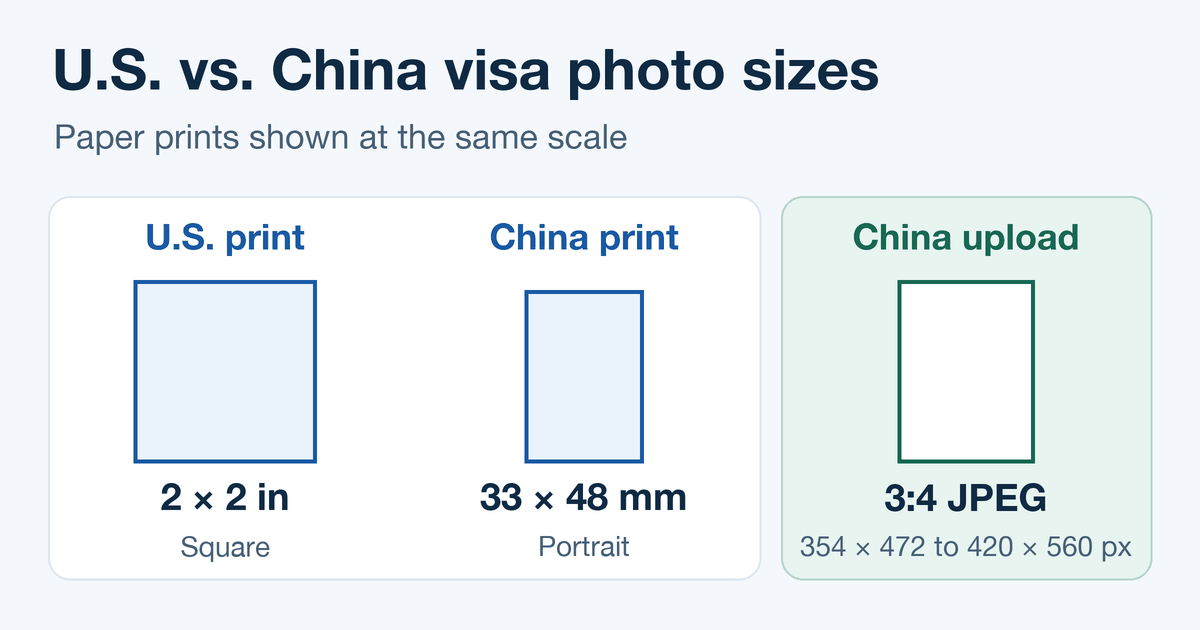
A finished 2 × 2 inch U.S. visa print or a square U.S. visa JPEG does not meet the published China visa photo dimensions as-is. China’s online form takes a portrait JPEG. If your visa office asks you to bring a paper photo, prepare a 33 × 48 mm portrait print.
| Photo | Width × height and shape |
|---|---|
| U.S. visa photo | Print: 2 × 2 inches (about 51 × 51 mm). Digital: 600 × 600 to 1200 × 1200 pixels. Both are square (1:1). |
| China visa paper photo | 33 × 48 mm print. Portrait (11:16). |
| China visa online upload | JPEG, 354 × 472 to 420 × 560 pixels. Portrait (3:4). |
Published specifications from the U.S. Department of State (print and digital) and the Chinese consulate in Chicago (Chinese). Follow the instructions from the visa office handling your application.
- Have the original digital photo? If you took it within the last six months and there’s enough room around your head and shoulders, start there. Make a separate crop for each format you need. Check digital framing and file requirements or paper head measurements.
- Only have the finished square print or file? Ask the photographer for the uncropped original. Scanning a print cannot recover anything outside its edges. Stretching the square to fill either portrait frame distorts your face. Retake the photo if you can’t get the original or it leaves too little room for the required framing.
Have a suitable original and need the JPEG? See the free iPhone preview and when to use it.
China visa photo requirements for U.S. applicants
Select the Chinese embassy or consulate that covers where you live. The nearby office or the one closest to your departure airport may serve a different district. Chinese Embassy jurisdiction notice
- Washington, D.C. embassy
- District of Columbia, Alabama, Arkansas, Delaware, Florida, Georgia, Kentucky, Louisiana, Maryland, Mississippi, North Carolina, Oklahoma, Puerto Rico, South Carolina, Tennessee, Texas, Virginia, and West Virginia.
- New York consulate
- Connecticut, Maine, Massachusetts, New Hampshire, New Jersey, New York, Ohio, Pennsylvania, Rhode Island, and Vermont.
- Chicago consulate
- Illinois, Indiana, Iowa, Kansas, Michigan, Minnesota, Missouri, Nebraska, North Dakota, South Dakota, and Wisconsin.
- San Francisco consulate
- Northern California, Alaska, Idaho, Montana, Nevada, Oregon, Washington state, and Wyoming.
- Los Angeles consulate
- Southern California, Arizona, Colorado, Hawaii, New Mexico, Utah, and U.S. Pacific islands including American Samoa, Guam, and the Northern Mariana Islands.
Texas and Florida are under the embassy in Washington, D.C. In California, check your county using the Los Angeles consulate’s ten-county list (Chinese).
- Open the official application. Sign in to China Online Visa Application, start an application for your office and upload the JPEG in the photo field under Personal Information. Check the JPEG photo size and framing before uploading.
- Track the online review. When your status shows Passport to be submitted, follow your office’s instructions for the original passport, printed barcode page and any other documents it asks for. Online review is one step in the visa decision.
- Check whether you need a separate print. Los Angeles says a successful photo upload removes the need to bring the photo. If the upload keeps failing, the embassy and New York explain when you can continue and bring a paper photo. Follow the instructions for your own office and case.
Official U.S. sources checked . Embassy application FAQ
What does the online system check?
The Chinese Embassy in the United States launched the China Online Visa Application system in September 2025; the form is now reached through consular.mfa.gov.cn/VISA/. Its guidance says that when you upload your photo, the system lets you adjust it with dragging and cropping tools and automatically determines whether it meets the requirements. The New York consulate publishes the same wording.
Neither page lists the exact tests the system runs, so nobody outside the system can tell you precisely why a particular photo failed. What you can control is the published specification: pixel dimensions, file size, format, how your head sits in the frame, and the quality of the original photo. Work through those in order, and change one thing at a time so you can tell which change made the difference.
Keep two kinds of failure apart. A photo that the checker rejects is a photo problem. A page that freezes, times out or will not open the file picker is a technical problem; try again later or in another up-to-date browser before you start re-editing a photo that may be fine.
Why does my photo keep failing, and how do I fix it?
1. The pixel size is outside 354 × 472 to 420 × 560
A phone photo is thousands of pixels wide, and a scan of a 33 × 48 mm print is often a different size again. Crop the photo to a 3:4 portrait shape around your head and shoulders, then resize it to a size inside the range. 354 × 472 matches the official example exactly; 420 × 560 is the largest allowed and keeps more detail. Do not stretch a photo to fit: crop first, then resize with the proportions locked.
2. The file is too large or too small
Above about 120 KB, export the JPEG again at a slightly lower quality setting. Below 40 KB, the photo has usually been compressed too hard and may look blocky; export again from the original at a higher quality, or use a larger pixel size within the range. Each re-save of a JPEG loses detail, so always go back to the original rather than compressing an already compressed copy.
3. The file is not really a JPEG
iPhones save photos as HEIC by default, and screenshots are PNG. Renaming photo.heic to photo.jpg does not change the format. Export or save the photo as JPEG in an editor, or change the iPhone camera format to “Most Compatible” (Settings › Camera › Formats) before taking a new photo.
4. Your head is too high, too low or the wrong size
This is the most common cause when the file itself is correct. On a 354 × 472 photo, your eyes must be at least 256 pixels above the bottom edge, which is about 54% of the height. The top of your hair should be 10 to 70 pixels below the top edge, and your face about 191 to 219 pixels wide. If you are using 420 × 560, scale these by the same factor of about 1.19: by our arithmetic, eyes at least about 304 px from the bottom, hair about 12 to 83 px from the top, face about 227 to 260 px wide. These scaled figures are our calculation, not an official table. If the frame is too tight, move back and retake the photo rather than enlarging a crop.
5. The background is not white enough, or there are shadows
The requirement is a white or near-white background without a border. A cream wall in warm indoor light can read as yellow, and a shadow behind your head can make the background uneven. Stand a little away from a plain light wall, face a window or a soft light, and avoid a single ceiling light directly overhead.
6. The face or pose does not meet the requirements
The specification asks for a face looking straight at the camera with complete facial features, both eyes open, mouth closed, ears showing and a natural expression. Your head may turn no more than 20 degrees left or right and tilt no more than 25 degrees up or down. Thick-framed glasses and tinted glasses are not allowed. Hats and head scarves are not recommended; if you wear one for religious reasons, it must not cover any part of your face. The photo must not be too dark or too bright, must show natural skin tone, must have no red-eye, and your eyes should be more than 60 pixels apart.
7. The photo is old, edited or not of you
The photo must have been taken within the last six months. Beauty filters, smoothing and heavy edits can change how your face looks and are a poor idea for any identity photo. The photo must match the applicant whose passport is on the form.
How can I check a photo before uploading it?
- On an iPhone: open the photo in Photos and swipe up. The information panel shows the format, pixel dimensions and file size.
- On a Mac: open the file in Preview and choose Tools › Show Inspector, or Tools › Adjust Size to see and change the pixel size.
- On Windows: right-click the file, choose Properties, then open the Details tab to see dimensions and size.
Then look at the photo itself at full size: is it sharp, is the light even across your face, is the background plain, and do the eyes sit above the middle of the frame? A photo that passes the measurements but looks blurred or dark can still be refused later in the review.
What should I do if the photo still fails?
The embassy and New York consulate say you can continue filling out other sections after repeated photo-check failures. Bring a qualifying paper photo when you submit your passport if the office tells you to do so. For another location, check the local procedure before relying on the paper fallback. U.S. office instructions
Applying from Australia? Use the Sydney and Melbourne China visa photo guide to find your centre and see when to bring a print after an unsuccessful upload.
For a printed photo, the same specification gives 33 mm wide × 48 mm high, head width 15–22 mm, head height (chin to crown) 28–33 mm, 3–5 mm from the top of the head to the top edge, and at least 7 mm below the chin. Passing the online check is not the end of the process: the embassy notes that online review approval does not guarantee visa issuance.
Can an app prepare the photo on an iPhone?
China Visa Photo crops a portrait on your iPhone to a 420 × 560 px JPEG, replaces the background with white and shows its framing and file checks in a free, watermarked preview. Each paid export gives you one JPEG.
Before paying: check whether your visa office accepts a digitally replaced background. If it requires an unaltered image, retake the photo against a real white wall. If you only need a 33 × 48 mm print, start with the original and prepare a separate paper crop. Your visa office decides whether to accept the photo.
Filling out the form on a computer? Move the saved JPEG to your computer as a file. Reopen the official form and upload that JPEG in the photo field.

Frequently asked questions
Is the 33 × 48 mm photo the same as the digital photo?
The online JPEG uses a 3:4 portrait ratio, including exports at 420 × 560 pixels. The 33 × 48 mm print uses an 11:16 ratio. Reframe the original photo separately for the print and check the head measurements. Stretching the JPEG to fill the print distorts the portrait.
Can I upload my square US visa photo?
No. The China online form uses a 3:4 portrait JPEG. A recent uncropped original can work if it has room to meet the framing rules. Compare the three formats and see when to retake the photo.
Can I wear glasses in a China visa photo?
The specification excludes thick-framed glasses and tinted glasses. Thin frames are not explicitly banned, but reflections can hide your eyes, so removing glasses is the simplest choice.
Does passing the online photo check mean the photo is accepted?
No. The online check is one step. Consular staff review the application, and the embassy states that online review approval does not guarantee visa issuance.
Sources and review
Written by the Visa Photo 1-Tap developer. Official pages were checked on . Requirements can change; the instructions of the mission handling your application take precedence.
- Chinese Embassy in the UK: photo specification for Chinese visa applications — pixel size, file size, colour, head, eye and face measurements, background, pose and printed size. Dated 2016-11-24 on the page.
- Chinese Embassy in the US: Guidelines for China Online VISA Application — automatic photo check, crop tools, what to do after multiple failed uploads, online review not guaranteeing issuance.
- Chinese Consulate General in New York: Guidelines for China Online Visa Application — same photo-upload instruction.
- Chinese Visa Application Service Center (London): common technical issues when uploading materials — links the photo specification above (notice dated 2026-08-26).
- China Online Visa Application — current address of the form. The older cova.mfa.gov.cn address did not load when checked.